
Advanced Search

LABeler™ Lab Printer

By MTC Bio
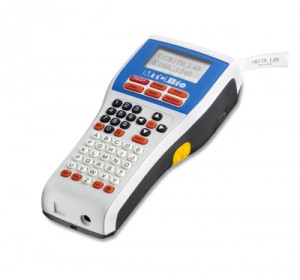
LABeler™ Lab Printer

Simplify the process of labeling sample tubes and containers. The LABeler™ Lab Printer provides the convenience of a pen with the benefits of a desktop printer. Simply type in the desired copy using the 50+ button key pad and press the print key—within seconds your label can be cut using the cut lever and is ready for application.

Over 15 available sizes, colors, and material combinations make the LABeler™ ideal for any lab vessel. Standard label tapes can be autoclaved, boiled, or even frozen as low as -50°C. Special Ultra-Low label tapes are also available for storage in -80°C environments or for liquid nitrogen applications.

         
Cat.No. Name EA    
28019-L9010 LABeler™ Lab Printer $325.20
1/EA
Add To Favorites
28019-L9010-12WK 26' cassette of 12mm lab tape, white w/ black print $56.90
1/EA
Add To Favorites
28019-L9010-12CK 26' cassette of 12mm lab tape, clear w/ black print $60.65
1/EA
Add To Favorites
28019-L9010-12ULT 20' cassette of 12mm ULT tape, white w/ black print $53.10
1/EA
Add To Favorites

The following items have been added to your cart:

Choose a favorite list for this item:

Catalog Number Description Price
$

Returns/Order support

Please fill out the form below if you want to request order support from Krackeler Scientific.


Quick Order

* Required


New Tariffs & Effects on Pricing

Tariff note: As we navigate the current environment of tariff surcharges and mid-year manufacturer price increases, we want to keep you informed. While we have avoided making specific decisions thus far, we anticipate that we will be forced to implement a cost adjustment policy to offset the fees we have already been absorbing. We are committed to transparency and moderation in this process.

800-334-7725
office@krackeler.com


Play Video

To Request a Quote

  1. Search or Browse for items and add to them to your Shopping Cart.
  2. Click the "Request Quote" button at the bottom of the Shopping Cart page.
  3. Fill out required fields.
  4. Optionally you can convert to standard checkout mode by choosing a payment type.
  5. Click "Request Quote" at the bottom of the page.

You will be contacted with a quote.

To Order From a Quote

  1. Register and login to the website.
  2. Receive a quote from your sales representative or customer service.
  3. Have your copy of the quote in hand.
  4. Visit our quote module to search for your quote.
Back to Top